Azure SaaS Architecture: Isolation, Reliability, and Unit Economics
- Microsoft Azure
- Azure SaaS architecture
- multitenancy
- tenant isolation
- deployment stamps
- cloud architecture
- FinOps
- Azure monitoring
Azure SaaS Architecture: Isolation, Reliability, and Unit Economics
An Azure SaaS platform is a commercial and operational system expressed through cloud resources. Its architecture must identify the correct tenant, prevent data crossing boundaries, absorb uneven demand, release changes across a fleet, recover a customer journey after failure, and explain the cost of serving each plan. A catalog of Azure products answers none of those questions.
Begin with business evidence: what constitutes a tenant, how organizations and users relate, which regions may hold their data, which customers require dedicated resources, what an outage costs, how quickly data must recover, which actions can wait, and how usage maps to price. Record expected tenant count, workload shape, noisy-neighbor risk, identity federation, compliance, onboarding time, support model, and exit obligations.
Then choose the smallest topology that meets those promises. Shared managed services often provide the best starting economics; selected data, compute, subscriptions, or complete stamps can be dedicated when isolation has measurable value. The Azure Well-Architected pillars are connected trade-offs: more redundancy changes cost, more isolation changes fleet operations, and richer telemetry changes privacy and spend. Our Azure architecture and development services turn those trade-offs into a production plan.
Map the Production Flow Before Selecting Services
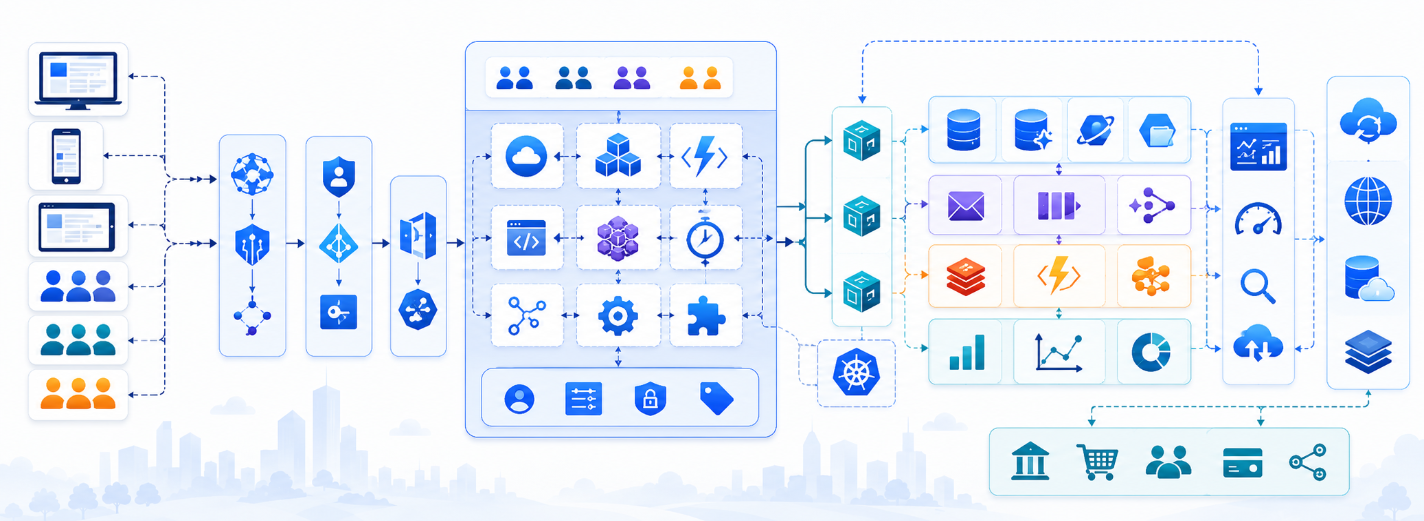
Draw every critical flow from edge to evidence. A browser request may enter through Azure Front Door for global routing, TLS, caching, and WAF policy, reach static hosting or server-rendered compute, pass through API Management when partner products need quotas and lifecycle policies, and arrive at App Service, Container Apps, Functions, or AKS. Choose compute from workload and operating capability; Kubernetes is valuable when its scheduling, networking, portability, or platform controls solve a real requirement.
Mark the system of record, cache, Blob Storage, Service Bus topics and queues, workers, external providers, secrets, and observability path. Keep synchronous work within a user-facing deadline and move durable work to messaging with explicit job identity, idempotency, retries, poison handling, ordering, cancellation, and reconciliation. A queue acceptance is a pending state, not proof that the business outcome occurred.
Use managed identity and Key Vault so workload credentials are not copied into configuration. Separate control plane from data plane: the control plane owns tenant catalog, placement, plans, entitlements, onboarding, suspension, and stamp lifecycle; the data plane serves customer operations. Document failure at every edge, including what the user sees and how an operator resolves uncertainty. Align subscriptions, management groups, policy, networking, and diagnostic foundations with an Azure landing zone.
Users and integrations
  │
Azure Front Door + WAF
  ├── Static frontend / SSR compute
  └── API Management when product policies require it
        └── Tenant router ── Control-plane catalog
              └── Assigned deployment stamp
                    ├── Managed compute
                    ├── Tenant-aware data and Blob Storage
                    ├── Service Bus ── Workers
                    ├── Key Vault via managed identity
                    └── Application Insights / Azure Monitor

Control plane
  ├── tenant identity, plan, entitlement, and stamp mapping
  ├── onboarding, movement, suspension, and deletion workflows
  └── capacity, versions, health, metering, and cost allocation
Make Tenant Isolation a Product Policy
Tenant isolation is a spectrum across identity, compute, network, data, encryption, telemetry, operations, and commercial terms. Shared resources maximize utilization but require disciplined tenant-aware authorization, queries, throttling, quotas, and noisy-neighbor controls. Dedicated databases, compute, resource groups, subscriptions, or stamps improve isolation and tenant-specific recovery while increasing baseline cost, provisioning time, connection management, upgrades, and fleet complexity.
Resolve tenant context from an authenticated, trusted mapping. A request header may select among memberships, but it must never establish authority by itself. Carry an immutable tenant identifier through authorization, repositories, cache keys, messages, storage paths, audit records, traces, and usage meters. Identity proves who is calling; authorization must still prove that this principal may perform this action on this resource within the selected tenant.
Use defense in depth: mandatory tenant predicates, database row-level security where appropriate, separate schemas or databases, private networking, encryption requirements, and automated tests that attempt cross-tenant reads, writes, cache access, file access, exports, support impersonation, and background processing. Treat tenant moves and deletion as designed workflows. The isolation tier should be a product entitlement with a price and operating model, not an improvised exception for the next enterprise sale.
- Shared: many tenants use the same compute and data services. It offers the lowest baseline cost and demands the strongest authorization, quotas, metering, and noisy-neighbor controls. Test isolation and fair use continuously with representative tenant sizes. Record any boundary failure as a security incident and any unfair saturation as a product-policy defect with a named owner and correction deadline.
- Partitioned: bounded tenant groups receive separate databases, pools, regions, or stamps, balancing shared efficiency with smaller failure and performance domains. Placement rules must consider capacity, residency, version, and risk.
- Dedicated: one tenant receives isolated resources when regulation, residency, performance, encryption, restoration, or contractual control justifies the baseline and fleet cost. Automation must keep dedicated estates current, observable, and replaceable.
- Hybrid: a control plane assigns each tenant to the appropriate tier and automates placement, movement, upgrades, metering, and lifecycle without creating manual exceptions. Every tier needs a published promise and operating owner.
Use Deployment Stamps as Operated Cells
A deployment stamp is an independently operated copy of a defined resource set serving a bounded group of tenants. Stamps can distribute load beyond service limits, place data in required regions, isolate regulated customers, contain blast radius, and support deployment rings. Their value comes from repeatability and bounded failure, not from duplicating resources manually.
A control plane needs an authoritative tenant-to-stamp catalog, capacity and placement rules, onboarding state, version inventory, health, maintenance mode, and move procedures. Traffic must resolve the correct stamp even when the nearest edge is elsewhere. Decide what remains global—often identity configuration, catalog, billing, or routing—and analyze how its failure affects every cell. A shared control plane can become the largest blast radius in an otherwise cellular design.
Define stamps with Bicep or Terraform and deploy them through one tested pipeline. Parameterize region, environment, capacity, isolation tier, and allowed differences; keep security, diagnostics, backups, policy, and identities consistent. Roll out progressively, verify customer journeys, and stop automatically on regression. Detect drift and rehearse replacement because a stamp that cannot be recreated predictably is a unique server estate wearing a cloud label.
targetScope = 'subscription'

param environment string
param region string
param stamp string
param isolationTier string

resource stampGroup 'Microsoft.Resources/resourceGroups@2024-03-01' = {
  name: 'rg-saas-${environment}-${region}-${stamp}'
  location: region
  tags: {
    workload: 'saas'
    environment: environment
    region: region
    stamp: stamp
    isolationTier: isolationTier
    costOwner: 'product'
  }
}

module workload './modules/workload-stamp.bicep' = {
  name: 'workload-${stamp}'
  scope: stampGroup
  params: { environment: environment, region: region, stamp: stamp }
}
Design Recovery and Observability by Customer Journey
Set reliability objectives for customer journeys before selecting redundancy. Availability Zones address datacenter-level failure; regional recovery addresses a different failure and requires data replication, routing, capacity, secrets, dependencies, and a decision about acceptable data loss. Define RPO and RTO per dataset and operation, then test backup restore and regional failover. An idle second region that has never processed representative traffic is an assumption, not a recovery capability.
Propagate operation, tenant, stamp, region, release, user, and message identifiers across HTTP calls, jobs, and providers. Use Application Insights, Azure Monitor, and OpenTelemetry to show latency, errors, saturation, queue age, dependency behavior, and the percentage of tenants completing critical flows. Separate platform health from tenant impact: one overloaded customer can be an incident without moving the global average.
Protect privacy and cost while preserving diagnosis. Do not place secrets or customer payloads in logs; classify fields, control access, choose sampling by signal, and set retention by investigation and regulatory need. Alerts need an owner, threshold rationale, runbook, and customer-impact statement. Exercise dependency failure, expired credentials, quota exhaustion, bad deployment, corrupt messages, restore, and failover. The purpose of Azure observability is to shorten correct decisions under pressure.
Connect Azure Spend to SaaS Unit Economics
Tags identify resource ownership, environment, region, and stamp, but they cannot allocate every shared charge to a customer. Add product metering for the units that drive cost and value: stored bytes, messages, active seats, model tokens, exports, compute-heavy operations, or another defensible measure. Join usage with Azure cost and commercial-plan data to calculate cost per tenant, plan, feature, journey, and stamp.
Make allocation rules explicit. Direct dedicated resources to their tenant; distribute shared baseline and platform costs with a documented method; distinguish idle capacity, growth headroom, support, and one-time migration expense. Review gross margin distributions, not only averages, because a few exceptional tenants can quietly consume the margin of an entire plan.
Use budgets, anomaly alerts, storage lifecycle rules, right-sizing, autoscaling bounds, reservations or savings plans for stable baseline demand, and architecture changes for persistent waste. Evaluate each saving against reliability, security, performance, and operating effort. Removing recovery capacity, undersizing a database to average load, or sampling away rare failures may reduce the bill while increasing business loss. Good SaaS architecture makes efficient sharing the default and prices exceptional isolation honestly.
Azure SaaS Architecture Review
- Tenant authority: Is tenant context derived from trusted identity and enforced in authorization, queries, cache keys, files, messages, telemetry, support tools, and deletion? Prove it with automated attempts to cross boundaries through every transport and privileged operator path.
- Flow integrity: Are synchronous requests, durable jobs, files, callbacks, retries, ambiguous outcomes, operator actions, and user-visible states mapped from entry to evidence? Test duplicate, delayed, reordered, partially completed, and permanently failed work.
- Fleet delivery: Can infrastructure, stamps, tenant onboarding, schema changes, progressive rollout, rollback, drift detection, and replacement run through tested automation? Recreate a stamp from source and compare policy, identity, diagnostics, backups, and application behavior.
- Recovery: Do critical journeys have SLOs, RPO, RTO, capacity limits, failure modes, tested restore and failover, degraded behavior, owners, and current runbooks? Record actual recovery time, data loss, manual steps, and customer communication after every exercise.
- Economics: Can the team explain usage, reliability, Azure cost, idle capacity, exceptional isolation, and gross margin by tenant, plan, feature, and stamp? Define who reviews anomalies and which pricing, capacity, or architecture decision each metric can trigger.
Does every SaaS tenant need dedicated Azure resources?
Does every SaaS tenant need dedicated Azure resources?
Should an Azure SaaS platform start on AKS?
Should an Azure SaaS platform start on AKS?
What makes a deployment stamp useful?
What makes a deployment stamp useful?
How should Azure SaaS costs be allocated?
How should Azure SaaS costs be allocated?
Turn Your Azure SaaS Constraints into a Testable Topology
Share your tenant model, data flows, isolation tiers, regions, recovery targets, workload evidence, and pricing logic. We will define the smallest safe Azure topology and the evidence required for production.
Publications
Our research
Research and development of AI-powered solutions to optimize business workflows and enhance decision-making processes.
Analysis of machine learning models for predictive analytics in finance, e-commerce, and SaaS platforms.
Exploration of natural language processing and computer vision technologies to strengthen automation, personalization, and customer support.
Microsoft Azure Development and Architecture Guide
A practical guide to Azure compute, data, networking, identity, reliability, delivery automation, observability, cost control and migration decisions for production workloads.

12 min read
25 Jul 2026
Azure Cloud Implementation: Migration Checklist and Mistakes
A practical Azure migration checklist for workload discovery, landing zones, strategy, identity, data, migration waves, recovery, performance, cost and operating ownership.
8 min read
04 Aug 2026
Azure Application Architecture: Development, Delivery, and Operations
Design Azure applications as an operating system: governed landing zones, workload-led service choices, secure identities, incremental modernization, infrastructure as code, progressive delivery, observability, resilience, and cost ownership.
9 min read
05 Aug 2026