Azure Cloud Implementation: Migration Checklist and Mistakes
- Azure Cloud
- Cloud Migration
- Cloud Implementation
- Cloud Architecture
Azure Cloud Implementation: Migration Checklist and Common Mistakes
Azure implementation is an operating-model change disguised as an infrastructure project. Moving a workload changes identity, networking, deployment, telemetry, recovery, cost allocation and the boundary between application and platform teams. Copying servers can move technical debt into a more elastic billing model without improving reliability or delivery.
Begin with business outcomes and workload requirements. Define the customer journeys in scope, availability and latency objectives, recovery time and recovery point objectives, data classification and residency, expected demand, change frequency, support hours, compliance obligations, budget boundaries and the owner who can accept a trade-off. Use the Azure Well-Architected pillars—Reliability, Security, Cost Optimization, Operational Excellence and Performance Efficiency—as a review lens, then make workload-specific decisions rather than treating the framework as a scorecard.
This checklist moves from discovery and strategy to a governed landing zone, migration waves and verified operations. It favors reversible steps, production evidence and explicit ownership. A migration is complete when the workload meets its agreed service and cost objectives in Azure and the operating team can deploy, observe, recover and improve it without dependence on the migration project.
Inventory Workloads, Dependencies and Business Commitments
Build a workload inventory, not merely a server list. For each workload, record business owner, users, critical journeys, environments, source repository, runtime, data stores, identity, certificates, secrets, inbound and outbound flows, DNS, integrations, scheduled work, operational tools, license constraints, support status, peak behavior, cost and customer commitments. Trace dependencies from actual traffic, configuration, telemetry and interviews; diagrams commonly omit manual jobs and aging connections.
Classify criticality and migration readiness. Capture current latency, error and saturation baselines, incident history, deploy frequency, backup success and restore evidence. Identify unsupported systems, undocumented ownership, hard-coded addresses, local state, shared databases, privileged service accounts, network allowlists and vendors that require notice. Map data sensitivity, retention, sovereignty and deletion duties before choosing a region or transfer mechanism.
Create dependency groups around business transactions. A front end, API, identity provider, queue, database and third-party service may need one migration wave even when they run on separate hosts. Name what must remain connected across hybrid boundaries and measure the latency and failure behavior of that connection. Unknowns receive owners and resolution dates; they do not silently become cutover assumptions.
Choose a Migration Strategy per Workload
Choose a disposition for each workload from evidence. Rehosting can reduce data-center dependency quickly but usually preserves operating weaknesses. Replatforming moves selected responsibilities to managed services and needs compatibility, performance and cost proof. Refactoring or rearchitecting can improve product economics and resilience when the commercial case justifies change, but combining a redesign with a fixed migration deadline increases uncertainty. Replacement, retirement and retention are valid outcomes when ownership, value or constraints support them.
Compare options against the same criteria: business interruption, data movement, security boundary, licensing, engineering capacity, skill availability, rollback, operational burden, expected cost and time to value. Run a small technical proof for the riskiest assumption, such as database behavior, network latency, identity federation, file semantics or vendor compatibility. Avoid selecting a service because it is newer; select the simplest model that meets the workload’s targets and can be operated by the responsible team.
Turn the portfolio into waves. Start with a representative workload whose failure is survivable and whose learning can improve the landing zone. Keep tightly coupled components together, define entry and exit criteria, reserve a stabilization period and prevent several critical cutovers from sharing the same responders. Every wave needs a decision date, accountable owner, communication plan, data reconciliation and viable rollback or forward-repair path.
- Rehost: move with minimal application change when the deadline matters more than modernization and the team accepts preserved operational debt.
- Replatform: adopt selected managed capabilities when compatibility, performance, recovery, cost and operating skills have been validated.
- Refactor or rearchitect: change application boundaries when measurable product, scale, resilience or delivery value justifies the added migration risk.
- Replace, retire or retain: avoid migrating a workload whose value, ownership, support status or constraints favor another product or a controlled exit.
Build the Landing Zone, Identity and Data Controls First
Establish the Azure landing zone before production workloads arrive. Design management-group and subscription boundaries, regions, network topology, DNS, hybrid connectivity, identity, policy, logging, security monitoring, resource organization and emergency access. Express the foundation as versioned infrastructure as code with reviewed changes and repeatable environments. Separate platform controls from workload configuration so ownership and exceptions remain clear.
Use Microsoft Entra identities, managed identities and least privilege wherever the workload supports them. Protect privileged roles with stronger authentication, time-bounded elevation and monitored emergency access. Place secrets and keys in controlled stores, define rotation, and remove credentials from code and pipelines. Model trust across human users, services, deployment identities and support operators; a private endpoint does not correct weak application authorization.
Classify data and map its full lifecycle: collection, transfer, storage, replication, backup, analytics, export, deletion and legal retention. Choose encryption and key ownership, network access, audit logs, masking and administrative paths from the threat model and obligations. Validate the destination and transfer tool with representative volume, change rate and failure. Freeze only what the cutover requires, reconcile records and preserve an evidence trail.
Test Performance, Cutover and Recovery with Evidence
Define a healthy state before testing. Use production-shaped traffic, data distribution and concurrency to measure latency percentiles, throughput, error rate, resource saturation, queue depth and dependency limits. Test steady load, peaks, rapid growth and a constrained dependency. Compare results with the original baseline and the service objectives; a successful HTTP response under a small synthetic load is not capacity evidence.
Rehearse cutover with a timed runbook. Include backups, replication lag, data validation, configuration, DNS and certificate changes, smoke tests, business acceptance, communication, rollback thresholds and named decision authority. Test idempotency and reconciliation when old and new paths can both process work. Keep the old environment recoverable until exit criteria are met, then remove routes and credentials deliberately.
Prove recovery rather than checking that backups exist. Restore representative systems and data into an isolated environment, measure achieved RTO and RPO, verify dependencies and have the operating team perform the procedure. Exercise zone or service failure at a level proportionate to criticality. Dashboards, alerts, logs, traces, on-call routing and repair instructions must work before the migration team leaves.
Common Azure Migration Mistakes and Their Consequences
The most common mistake is treating resource creation as migration progress. Teams build production before identity, policy, network ownership, logging and cost allocation are settled, then retrofit controls under deadline. Another is moving every workload with one pattern: rehosting systems that should retire, refactoring stable systems without a business case, or adopting complex managed services before the team can operate them.
Data and dependencies produce quieter failures. Incomplete inventories miss a batch job, IP allowlist, certificate, reporting feed or manual support step. A transfer plan measures bytes but ignores change rate, reconciliation, retention and rollback. A big-bang cutover couples unrelated risks and exhausts responders. Performance tests use average data, while the largest tenant or month-end process determines the real limit.
Operational mistakes appear after launch: production changes made manually, alerts with no owner, backups never restored, shared administrator credentials, unbounded logs, patch responsibility left between teams and no budget response. Avoid them with infrastructure as code, policy, named service ownership, release evidence, restore exercises, a support model and post-wave review. Exceptions need an owner, expiry and compensating control.
Control Cost Through Architecture and Ownership
Create a cost model before migration. Connect demand units—transactions, tenants, users, data volume, model calls or jobs—to compute, storage, network, managed-service, security, observability, support and license costs. Model normal, peak and failure capacity, data growth, backups, cross-region and outbound transfer, nonproduction environments, commitments and taxes. Compare options by total workload cost and business value rather than virtual-machine price alone.
Implement tags or other allocation metadata, budgets, anomaly alerts and accountable owners from the landing zone. Use Azure cost data with application telemetry so teams can explain which product behavior drove a change. Review idle resources, oversized capacity, storage tiers, retention, reservation or savings commitments and architectural hotspots. Commitment discounts follow a stable usage baseline; they should not hide uncertain demand or prevent an expected redesign.
Cost optimization is a continuous engineering decision. Reducing redundancy can damage reliability, aggressive autoscaling can create latency, and excessive telemetry can become expensive while insufficient telemetry raises incident cost. Set unit-cost and service-objective guardrails together. Each optimization proposal should identify the expected saving, workload effect, implementation cost, validation period and rollback.
A successful Azure migration leaves a workload that the receiving team can deploy, observe, recover, secure and fund against measurable business objectives.— GARNO.TECH
Migrate in Bounded Waves and Prove Each One
Approve each wave only when inventory, dependencies, strategy, target architecture, security and data controls, capacity evidence, recovery, operations, cost ownership and rollback meet defined criteria. Record accepted risk and exceptions. After cutover, hold a stabilization review using real telemetry and customer outcomes; close the wave only after the receiving team owns deployment, incidents, recovery and spend.
Treat findings as improvements to the migration system. Update landing-zone modules, policies, runbooks, estimates and training after every wave. Stop expanding scope when evidence exposes a faulty assumption. A smaller wave that reveals how the organization operates Azure is more valuable than a fast transfer that leaves fragile ownership. Measure whether later waves become safer, faster and easier to forecast; otherwise the programme is repeating activity rather than building capability.
GARNO.TECH can assess the portfolio, design the landing zone and workload architecture, implement automation, execute a bounded migration, or validate a client-led programme through Azure cloud development. The engagement should leave decision records, client-controlled accounts, reproducible infrastructure, operating evidence and a clear path for the next workload.
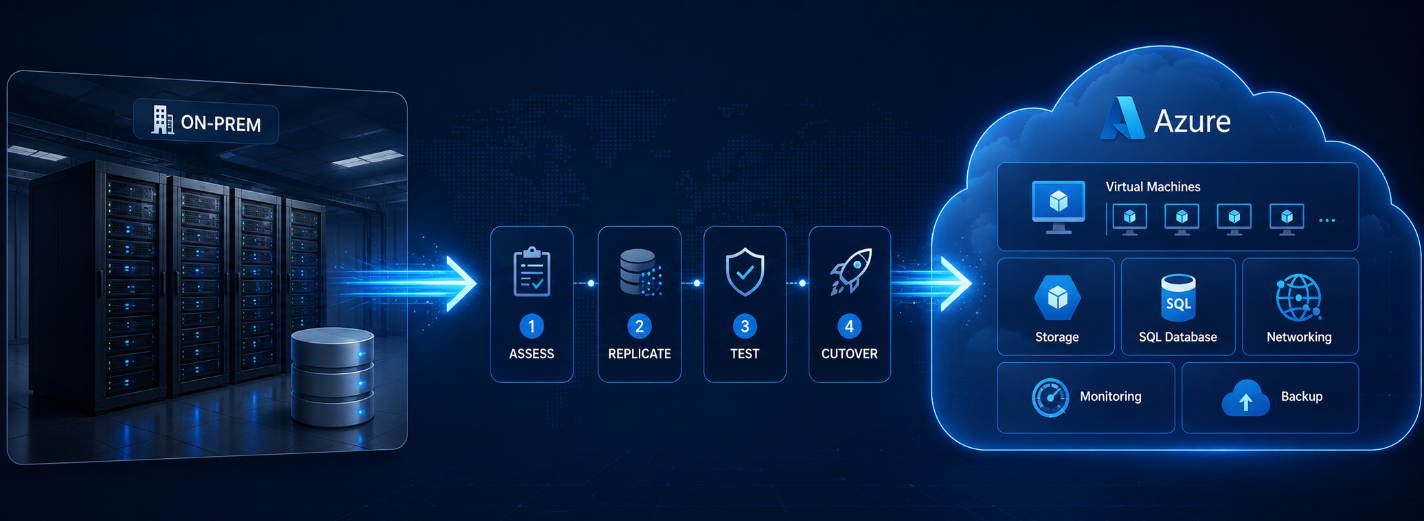
A Four-Stage Azure Migration Checklist
- /01Discover and DefineMap business journeys, workloads, dependencies, data, ownership, current baselines and commitments; define material service, security, recovery and cost objectives.
- /02Prepare the FoundationBuild the governed landing zone, identity, connectivity, policy, telemetry, deployment automation, cost allocation and operating responsibility before production.
- /03Prove and MigrateValidate the riskiest assumptions, rehearse transfer and recovery, then execute a bounded wave with reconciliation, business acceptance and rollback thresholds.
- /04Stabilize and ImproveObserve real service and cost outcomes, transfer operations, close exceptions, update reusable controls and approve the next wave from evidence.
Should all workloads migrate to Azure in one wave?
Should all workloads migrate to Azure in one wave?
Plan an Azure Migration Around Workload Evidence
Bring the workload inventory, business objectives, dependency map, service commitments, data constraints, current costs and target timeline. We will identify the highest-risk assumptions and define a bounded first wave with acceptance, recovery, ownership and cost controls.
Publications
Our research
Research and development of AI-powered solutions to optimize business workflows and enhance decision-making processes.
Analysis of machine learning models for predictive analytics in finance, e-commerce, and SaaS platforms.
Exploration of natural language processing and computer vision technologies to strengthen automation, personalization, and customer support.
Fractional CTO vs Full-Time CTO: Choose the Leadership Capacity You Need
Choose a technology leadership model from decision load, executive accountability, availability, people management, company complexity, economics, risk, transition triggers, and measurable outcomes.

9 min read
08 Sep 2026
How to Evaluate a Development Team Without Distorting Its Work
Assess an existing development team through outcomes, delivery flow, technical judgment, reliability, ownership, collaboration, and working conditions—then turn evidence into a fair improvement plan.

9 min read
08 Sep 2026
How to Choose a FinTech Development Company: 10 Evidence-Based Criteria
Evaluate FinTech development companies through product evidence, financial workflows, security, compliance, integrations, architecture, testing, delivery, contracts, and support.

12 min read
30 Jul 2026